
Key point
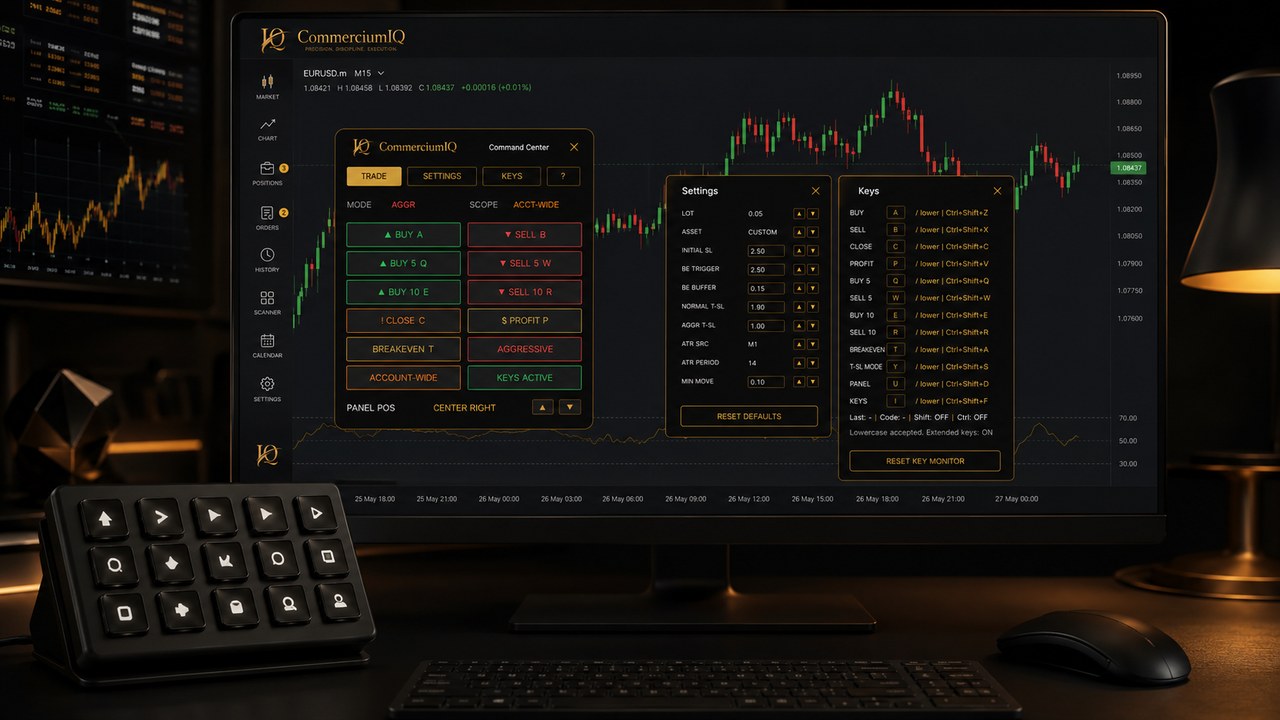
A generic macro pad is a physical input device. A trading command center is a software workflow layer. They can work together, but they solve different problems and should not be described as the same product.
The safest MT5 setup combines clear physical labels, visible software command names, and a demo-tested mapping record before any high-impact command is used.
What a generic macro pad actually provides
A generic macro pad gives the user extra programmable buttons. Those buttons can send keyboard shortcuts, text, or device-specific macro sequences depending on the hardware and vendor utility.
The pad does not know whether MT5 is active, which symbol is open, which account is selected, or what position scope the user intended. It only sends the input it was configured to send.
That makes the macro pad useful as an input layer, but incomplete as a trading workflow by itself.
What a command center provides
A command center gives the user a visible list of trading-related actions. It can group entry, protection, close, utility, and mapping commands into a layout that is easier to review than hidden shortcuts.
The command center creates a shared language for setup, support, and documentation. Instead of saying a random button was pressed, the user can name the software command and compare it with the physical label.
This software layer is where CIQ can provide value even when the user supplies their own keyboard or macro pad.
Why the two are often confused
Searchers often use phrases like trading keyboard, macro pad, Stream Deck, hotkey software, and command center interchangeably. That confusion is understandable because all of them can reduce clicking.
But reducing clicks is not the same as creating a safe workflow. A physical key may be easy to press while the underlying command remains unclear.
A macro pad is the physical trigger, while a trading command center is the organized software environment behind the command.
Labeling risk on generic pads
A generic pad becomes risky when the buttons are unlabeled, poorly labeled, or labeled differently from the software behavior. A button marked close may not tell the user whether it closes current symbol, profit-only exposure, or a broader set of positions.
Labels should be short but exact. Buy, Sell, BE, Close Profit, and Current Symbol are clearer than decorative icons that require memory under pressure.
If a user hesitates before pressing a key, the label or layout is not ready.
Profile and layer risk
Many programmable devices support profiles, layers, or app-specific mappings. Those features are useful, but they can create errors if the wrong profile is active or if a button sends a command from a previous layout.
A command center can reduce some confusion by showing the intended software command, but the physical device still needs its own mapping record.
The user should retest after changing a macro pad profile, updating device software, or moving the pad to another computer.
Command scope still matters
The macro pad does not decide command scope. The software command and MT5 environment determine what can be affected. This distinction is especially important for close, breakeven, and trade-management actions.
A current-symbol command should be tested differently from a broader close command. A close-profit action should be tested with profitable and losing positions visible in the account.
Scope testing is the bridge between a physical button and a trustworthy workflow.
When a generic macro pad is enough
A generic macro pad may be enough when the user maps only a small number of low-impact actions and maintains a clear printed layout. It can also be enough for non-trading utilities such as opening a panel, changing a view, or accessing a checklist.
The device becomes more demanding when it is used for actions that open, close, or modify positions.
In those cases, the user needs stronger documentation and a more careful test routine.
When a command center is better
A command center is better when the user wants a visible workflow that matches product documentation. It is also better when the same command names will appear in support articles, setup instructions, and macro pad labeling sheets.
This makes the workflow easier to teach, troubleshoot, and rebuild after a device change.
The command center does not replace the pad; it gives the pad a clearer software target.
How to test them together
The combined test should start slowly. The user chooses one physical key, confirms the software command it should trigger, presses it once in demo, and then verifies the MT5 result in the position list.
The test should be repeated for each command, especially for close and protection actions. A physical layout is not ready just because one key worked once.
The user should record the date, device profile, software command, expected result, and actual result.
Software and hardware are separate
CIQ Traders Keyboard is software-only. Physical keyboards and macro pads are not included, and device images are illustrative examples for layout planning.
You can connect your own compatible input device after reviewing the setup and keyboard-mapping guidance. The physical device, its profile software, and the MT5 command result must all be tested together.
This distinction helps you decide whether you need software guidance, hardware flexibility, or both.
Review the setup before choosing
Continue with the keyboard-mapping guide, macro-pad setup page, MT5 compatibility requirements, and buyer checklist.
Use those pages to confirm your setup responsibilities before purchasing or mapping high-impact commands.
A careful comparison considers the complete workflow, not only the price or number of keys on the device.
Final macro-pad comparison rule
Choose a generic macro pad when you can maintain the device mapping yourself and the command list is simple. Choose a trading command center when you need visible command names, aligned documentation, and a supportable MT5 workflow.
Use both only after the physical key, software command, and MT5 result match in demo.
That rule keeps the product useful without turning a physical device into a promise of better trading.
Physical layout examples to test first
A conservative macro pad test should begin with low-risk utility commands before high-impact trade commands. The user can test panel visibility, mapping view, or a non-order action before assigning entry or close behavior.
When trade-management commands are added, they should be physically separated. Entry commands should not sit beside close-all or close-profit commands unless the layout makes the difference obvious.
The goal is to prove that the physical layout supports deliberate action rather than fast guessing.
When to leave a macro key unmapped
A blank key can be a safety feature. If the user is unsure what a button should do, it is better to leave that key unmapped than to fill the pad for the sake of using every button.
This is especially true for traders who are moving from ordinary MT5 controls to a macro pad for the first time. A smaller, tested layout is easier to trust than a full layout that has not been practiced.
The command center can grow after the user demonstrates that each mapped key is understood and verified in demo.