Can keys be remapped?
Yes. The software is designed around visible key mapping so users can confirm the command tied to each key before using it.
 CommerciumIQTraders Keyboard
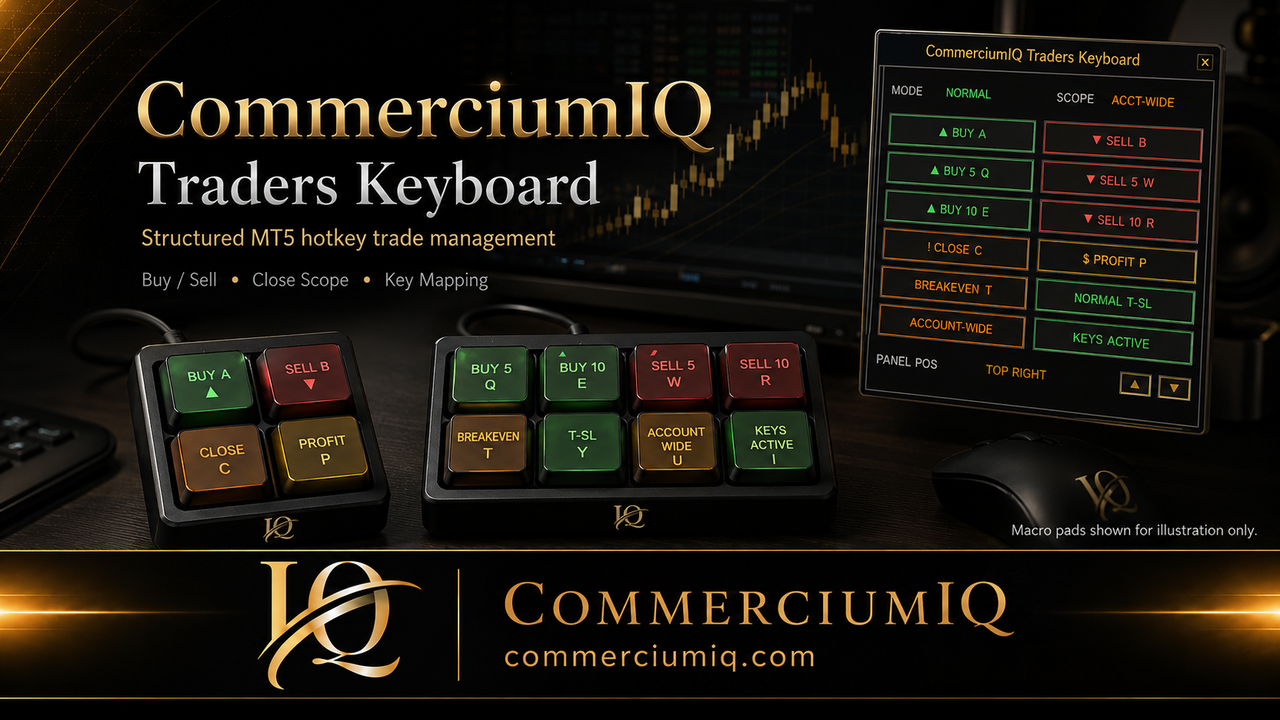
Keyboard mapping
CIQ Traders Keyboard supports primary single-key commands and laptop backup shortcuts so traders can build a consistent action layer for MetaTrader 5 Desktop.
Quick answers
Keyboard mapping should be treated as a workflow control layer, not as a trading decision system.
Yes. The software is designed around visible key mapping so users can confirm the command tied to each key before using it.
Yes. Test each macro-pad key on a demo chart and confirm the software receives the intended key code before live use.
Backup shortcuts provide a secondary way to trigger common commands if a dedicated macro-pad key is not being used.
The main risk is pressing the wrong key, using the wrong scope, or testing multi-order commands with an unsuitable lot size.
Default command map
Mapping is useful only when the user can explain what each key does before pressing it.
| Action | Primary key | Laptop backup shortcut | Purpose |
|---|---|---|---|
| Buy | A / a | Ctrl + Shift + Z | Open configured buy action. |
| Sell | B / b | Ctrl + Shift + X | Open configured sell action. |
| Close all by scope | C / c | Ctrl + Shift + C | Close according to selected scope. |
| Close profitable by scope | P / p | Ctrl + Shift + V | Close profitable positions according to selected scope. |
| Buy 5 / Sell 5 | Q / W | Ctrl + Shift + Q / W | Multi-order workflow after demo testing. |
| Buy 10 / Sell 10 | E / R | Ctrl + Shift + E / R | Higher-count workflow after careful demo testing. |
| Breakeven + Buffer | T / t | Ctrl + Shift + A | Protect Now command when conditions allow. |
| Trailing mode | Y / y | Ctrl + Shift + S | Toggle Normal or Aggressive T-SL mode. |
| Panel | U / u | Ctrl + Shift + D | Show or hide the Command Center panel. |
| Keys tab | I / i | Ctrl + Shift + F | Open the keyboard mapping tab. |
Keyboard mapping can make a workflow faster, but it can also make mistakes happen faster if commands are unclear. A trader should not rely on memory alone for high-impact actions such as close all, close profit, account-wide scope, breakeven, or trailing-stop mode changes.
The safest mapping workflow is visible, labeled, and tested. The software label, keyboard mapping, physical label, and trader expectation should all match. If any of those layers disagree, the mapping is not ready for live use.
Macro pad setup
The software does not include a physical keyboard or macro pad. Many users may pair it with a programmable 4-key, 5-key, 8-key, 10-key, 12-key, or 15-key macro pad. The important part is that the physical device sends the key combinations configured in the software.
Hardware is only an input layer. A macro pad does not understand market context, account scope, symbol focus, or trade risk. It simply sends the key or shortcut the user programmed. That is why labeling and demo testing are part of the setup, not optional polish.
Useful for Buy, Sell, Close, and Profit Close.
Useful for core actions plus breakeven and mode control.
Useful when you want direct access to multi-order and panel controls.
Mapping safety
A good layout is not just compact. It is organized by risk category.
Buy and Sell commands should be easy to understand and hard to confuse with close commands. Before mapping an entry key, confirm lot size, account, chart symbol, broker symbol naming, and whether the user understands the command’s actual behavior in MT5 Desktop.
Multi-order keys such as Buy 5, Sell 5, Buy 10, and Sell 10 should be treated as higher-impact commands. They should not be mapped casually or placed beside ordinary single-entry commands unless the user has tested them thoroughly on demo.
Close all and close profit keys require scope awareness. A close command can be current-symbol focused or broader account-wide depending on the selected workflow. That distinction should be visible in the software and reflected in physical key labels where possible.
Close all should not sit beside Buy or Sell unless the user has a deliberate confirmation routine. A broad close command deserves a clearer label and a safer physical position.
Breakeven and trailing-stop commands are post-entry management actions. They should be grouped separately from entry actions so the user recognizes the category before pressing the key.
Normal and aggressive trailing-stop modes should be labeled clearly. A user should not have to remember a vague symbol when the difference can affect stop-management behavior.
Demo test routine
The test is not complete until the user can predict each mapped action before pressing it.
Test each mapped key one at a time in demo before combining commands into a routine.
Test current-symbol and account-wide behavior with multiple open symbols where relevant.
Confirm that physical labels, software labels, and user expectations all match.
Intentionally focus the wrong chart in demo to see how the workflow behaves.
Confirm laptop backup shortcuts still work if the physical macro pad is unavailable.
After any mapping change, update labels and retest before live use.
CIQ Traders Keyboard is software-only. It does not include a physical keyboard, macro pad, keycaps, printed labels, hardware accessories, broker account, trading signals, or a trading strategy.
Users who choose to use their own compatible macro pad are responsible for programming the device, labeling keys, and confirming the layout in demo before live use.
Related mapping resources
Understand how your own compatible macro pad can fit into the software workflow.
Review close-command scope risk before mapping high-impact keys.
Understand command boundaries before relying on fast input.
Verify every direct key and backup shortcut inside the product before connecting your own keyboard or macro pad. Use distinct labels, separate high-impact commands, and check for operating-system or application shortcuts that could intercept the same input.
Continue with Macro Pad Setup, review command scope, and run the pre-click checklist after any mapping change.
A clear map can reduce confusion, but the user remains responsible for the physical device, labels, key output, and final command test.
Founders Promo: $49.99 USD one-time. Regular price: $99.99 USD.
Get Founders Access on Gumroad