One-symbol test
Start with one small demo position on one symbol and confirm how normal trailing behavior updates.
 CommerciumIQTraders Keyboard
Trailing-stop workflow
Trailing-stop hotkeys can help make stop-management more consistent, but the settings must match the asset, timeframe, broker conditions, and user’s trade plan.
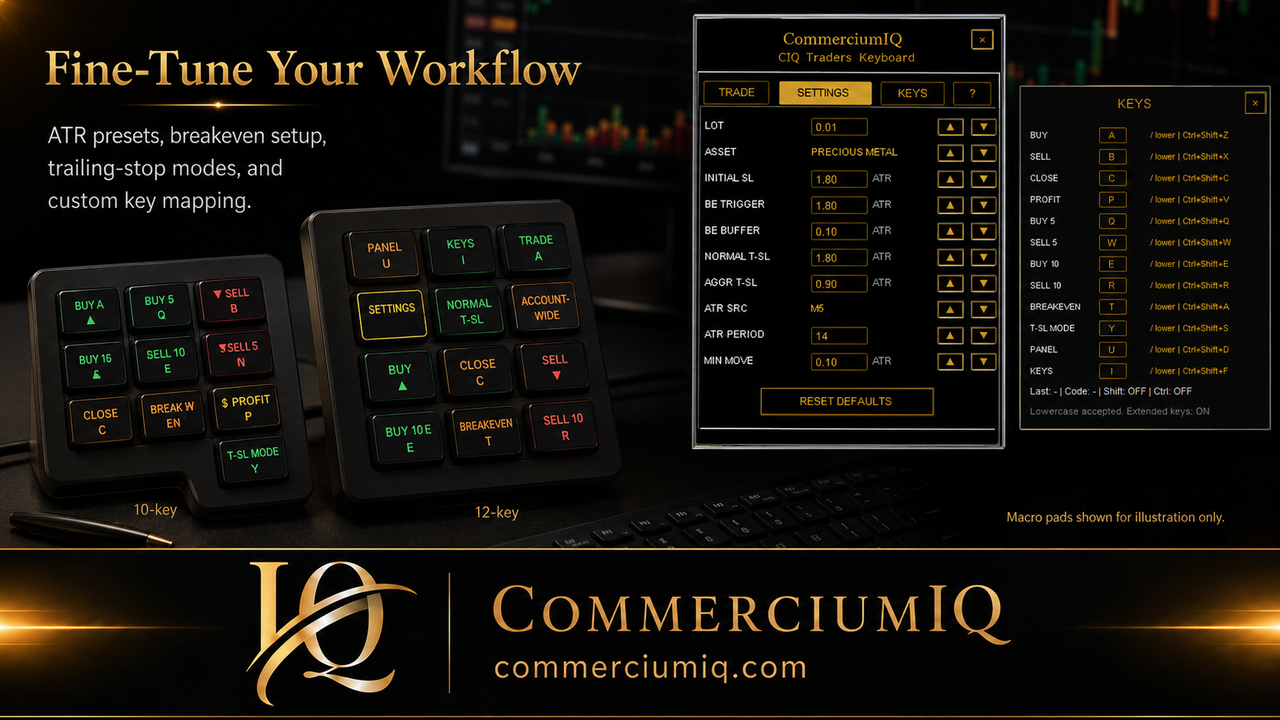
Mode comparison
Normal and aggressive trailing-stop modes are workflow choices. Neither mode is automatically better; each one has different trade-offs.
| Mode | Typical purpose | Main risk |
|---|---|---|
| Normal T-SL | Allows more breathing room | May protect slower during sharp reversals |
| Aggressive T-SL | Tighter management after favorable movement | Can be stopped out sooner in noisy markets |
| Min Move | Controls how often updates matter | Too low may create too many attempted updates |
A trailing-stop hotkey or command helps the trader apply a configured stop-management workflow more quickly than manual clicking. In CIQ Traders Keyboard, the focus is workflow organization: visible settings, clear mode selection, and user-triggered controls for MT5 desktop use.
The hotkey does not decide whether the trade is valid. It does not choose the market direction. It does not guarantee that a stop update will be accepted by the platform or broker. The trader still needs to confirm the active account, symbol, position, spread, and whether the trailing setting makes sense for the current market.
ATR context
Gold, forex pairs, indices, and crypto can behave very differently. ATR-based settings provide a framework, but they are not universal. Demo testing is the only practical way to verify whether a setup fits your symbol and broker feed.
A setting that feels reasonable on a quiet forex pair may be too tight for gold during a volatile session. A setting that gives enough room on one broker feed may behave differently on another broker’s symbol because of spread, contract specifications, and execution conditions.
Often needs more room due to wicks and volatility.
May work with tighter logic on liquid pairs, but spread still matters.
Can move quickly and require extra caution.
Workflow details
The command is only one part of the workflow. Settings, broker rules, and market behavior matter just as much.
Normal trailing-stop mode is intended to allow more breathing room. It may be better suited to conditions where price needs space to fluctuate while the trader still wants a structured management process. The trade-off is that wider spacing may react more slowly if price reverses sharply.
Normal does not mean safe. It simply means less aggressive relative to the tighter mode. The trader still needs to confirm whether the stop distance, minimum move, and update behavior fit the symbol being traded.
Aggressive trailing-stop mode is intended to manage the stop more tightly after favorable movement. This may help a trader lock in movement sooner, but it can also cause the position to be stopped out earlier in noisy or wick-heavy markets.
For gold, indices, and volatile sessions, aggressive settings should be treated carefully. A tighter stop can feel protective, but it can also cut a trade before the original plan has enough room to develop. Demo testing is required before deciding whether aggressive mode belongs in a live workflow.
Minimum move settings help control how often a trailing-stop update is meaningful. If the value is too low, the workflow may attempt many small updates. If it is too high, the stop may update less often than the trader expects.
This is not only a comfort setting. Repeated modification attempts can interact with platform conditions, broker rules, and fast-moving markets. A good test should show whether the update rhythm is realistic for the user’s symbol and timeframe.
Demo test routine
The user should understand what the workflow is expected to do before mapping it to a hotkey or macro pad.
Start with one small demo position on one symbol and confirm how normal trailing behavior updates.
Switch to aggressive mode and compare how much sooner the stop moves or exits in noisy movement.
Test during normal and wider spread periods to see whether settings are too tight for the symbol.
Test both buy and sell positions so the user understands behavior on both sides of the market.
Compare intended symbols such as gold, forex pairs, or indices if supported by the broker.
Confirm that any mapped key or macro pad label clearly distinguishes normal and aggressive modes.
Trailing-stop controls are trade-management actions, not entry actions. They should be placed away from Buy and Sell keys and clearly labeled so the user does not confuse normal trailing, aggressive trailing, breakeven, close profit, or close all.
If a physical macro pad is used, the labels should make the mode obvious. Short labels may be acceptable only if the trader has tested and memorized the layout. A label such as “Normal T-SL” or “Aggressive T-SL” is clearer than a vague symbol that depends on memory.
CIQ Traders Keyboard is software-only MT5 desktop workflow support. It does not include hardware, provide trading signals, recommend entries, act as a broker, guarantee profit, guarantee stop execution, or remove slippage and market risk.
Hardware images are illustrative only. Users who connect their own compatible keyboard or macro pad are responsible for mapping, labeling, and testing the physical input layer before live use.
Related guides
Compare trailing-stop management with breakeven plus buffer behavior.
Review key assignments, labels, and backup shortcuts.
Understand scope before using close or management commands.
Test Normal and Aggressive trailing behavior on the same symbol and lot size so you can observe trigger timing, stop movement, broker stop-level restrictions, and the effect of spread and volatility. Confirm which mode is active before relying on the workflow.
Compare trailing management with the Breakeven + Buffer workflow, verify the assigned toggle in Keyboard Mapping, and repeat the test after changing any trailing value.
A trailing stop can help manage an open position, but it cannot guarantee captured profit, prevent gaps or slippage, or make an unsuitable trade safe.
Founders Promo: $49.99 USD one-time. Regular price: $99.99 USD.
Get Founders Access on Gumroad