One-position test
Open one small demo position and confirm when the breakeven action becomes eligible.
 CommerciumIQTraders Keyboard
Breakeven workflow
Breakeven plus buffer can help standardize a protection workflow, but it does not remove market risk, slippage, spread behavior, or the need for demo testing.
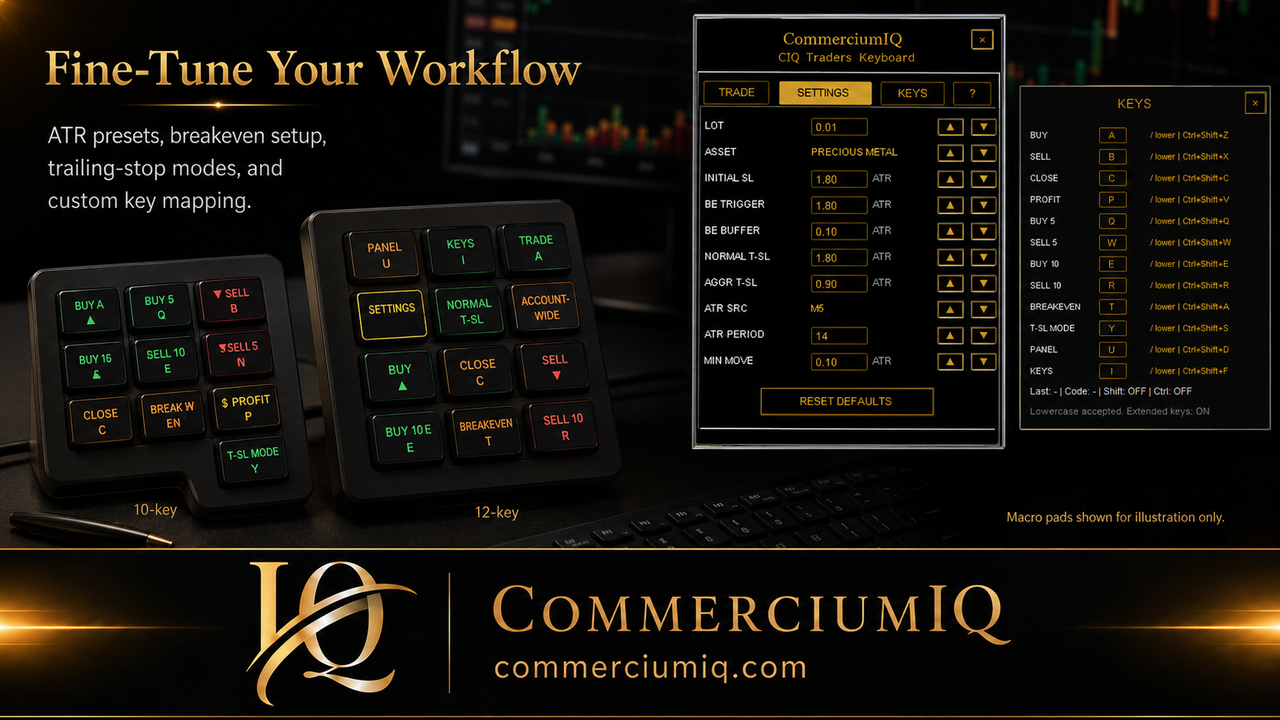
Concept
In CIQ Traders Keyboard, the breakeven/protect action is designed around a trigger and a buffer. The trigger defines when the action becomes relevant, while the buffer defines how much space beyond entry may be requested when conditions allow.
For traders, the key lesson is not to press protection commands randomly. The setup should be demo tested on the broker, symbol, spread, and session being used.
A breakeven hotkey should be understood as a trade-management shortcut, not a safety guarantee. It can help organize a repeated action, but it cannot force the market to respect the stop level, avoid gaps, or protect against platform and broker restrictions.
| Setting | Meaning | Practical reminder |
|---|---|---|
| BE Trigger | How much favorable movement is generally needed first | Lower values activate sooner but can be premature |
| BE Buffer | Extra space beyond entry | Too tight may still be vulnerable to spread/wicks |
| Min Move | Minimum meaningful update distance | Helps avoid unnecessary repeated changes |
How it works
The user should know when the command is eligible, which position it may affect, and what broker conditions can block or change the result.
The breakeven trigger is the general favorable movement condition that makes a protection action relevant. The buffer is the extra distance beyond entry that may be requested. Minimum move logic helps avoid repeated small updates that may not be useful or may be rejected by platform constraints.
These settings are practical workflow controls. They are not a market edge. A trader still needs to understand the trade plan, spread, volatility, position direction, and whether moving the stop too soon would interfere with the original setup.
A breakeven command can be affected by spread, broker stop-level rules, freeze-level behavior, execution conditions, and symbol specifications. The same settings may behave differently on gold, forex pairs, indices, or crypto CFDs depending on broker support and symbol conditions.
This is why the workflow should be tested on the exact symbol and account type the trader intends to use. A setting that feels reasonable on one market can be too tight or too loose on another.
Breakeven logic should be tested on both buy and sell positions. Traders often test only one side and assume the other side behaves the same. In a real workflow, bid/ask behavior, spread, and stop placement can make the experience feel different.
Testing both directions also helps the trader confirm that labels, shortcuts, and software feedback are clear. The goal is not merely to see whether a command fires. The goal is to understand what it is trying to do before it is used live.
Demo test routine
Breakeven workflow should be rehearsed slowly before it becomes a hotkey habit.
Open one small demo position and confirm when the breakeven action becomes eligible.
Test both long and short positions so direction-specific behavior is understood.
Test during normal and wider spread conditions to see how buffer settings feel.
Compare behavior across intended symbols such as gold, forex, or indices where supported.
Confirm whether the action is current-symbol focused or could interact with broader workflow settings.
Repeat the routine until the user can explain expected behavior before pressing the hotkey.
Breakeven is usually a post-entry management action. That means it should not be placed or treated like an entry key. On a keyboard or macro pad, a breakeven shortcut should be separated from buy, sell, close all, and account-wide commands so the trader can recognize the action category before pressing it.
The feature works best when combined with a pre-click routine: confirm account, symbol, position, direction, scope, and whether the trade has moved enough for the breakeven action to make sense. A hotkey can make the action faster, but the decision still belongs to the trader.
CIQ Traders Keyboard is software-only MT5 desktop workflow support. It does not include hardware, provide trading signals, recommend entries, act as a broker, guarantee profit, guarantee stop execution, or remove slippage and market risk.
Hardware images are illustrative only. Users who connect their own compatible keyboard or macro pad are responsible for mapping, labeling, and testing the physical input layer before live use.
Related guides
Review the default CIQ Traders Keyboard hotkeys and laptop backup shortcuts.
Understand scope before using close commands.
Compare breakeven workflow with normal and aggressive trailing-stop workflow.
Use a demo position to confirm when Breakeven + Buffer becomes available, where the stop is moved, and how the configured buffer behaves for your broker symbol and price digits. Broker stop-level rules, spread, and execution conditions can affect whether a stop modification is accepted.
Compare the result with the trailing-stop workflow and confirm the assigned key in the keyboard-mapping guide. Repeat the test after changing any protection setting.
Breakeven tools support manual trade management; they do not remove market risk, guarantee a risk-free trade, or guarantee that a position will close without loss.
Founders Promo: $49.99 USD one-time. Regular price: $99.99 USD.
Get Founders Access on Gumroad