
Key point
Buying an MT5 trading tool should begin with product fit, not excitement. The buyer should confirm what is included, which MT5 environment is supported, what the commands can control, and what remains the trader's responsibility.
A careful buying checklist prevents hardware assumptions, platform mismatch, unrealistic expectations, and confusion about what a workflow tool can actually do.
Use this checklist before choosing a product category
This page is the broad first-stage checklist for comparing software, scripts, Expert Advisors, keyboards, macro pads, and other MT5 workflow tools.
After a specific software product reaches your shortlist, use the MT5 Execution Software Due Diligence Checklist for installation, permissions, updates, licensing, and demo-test evidence.
Check one: what is included
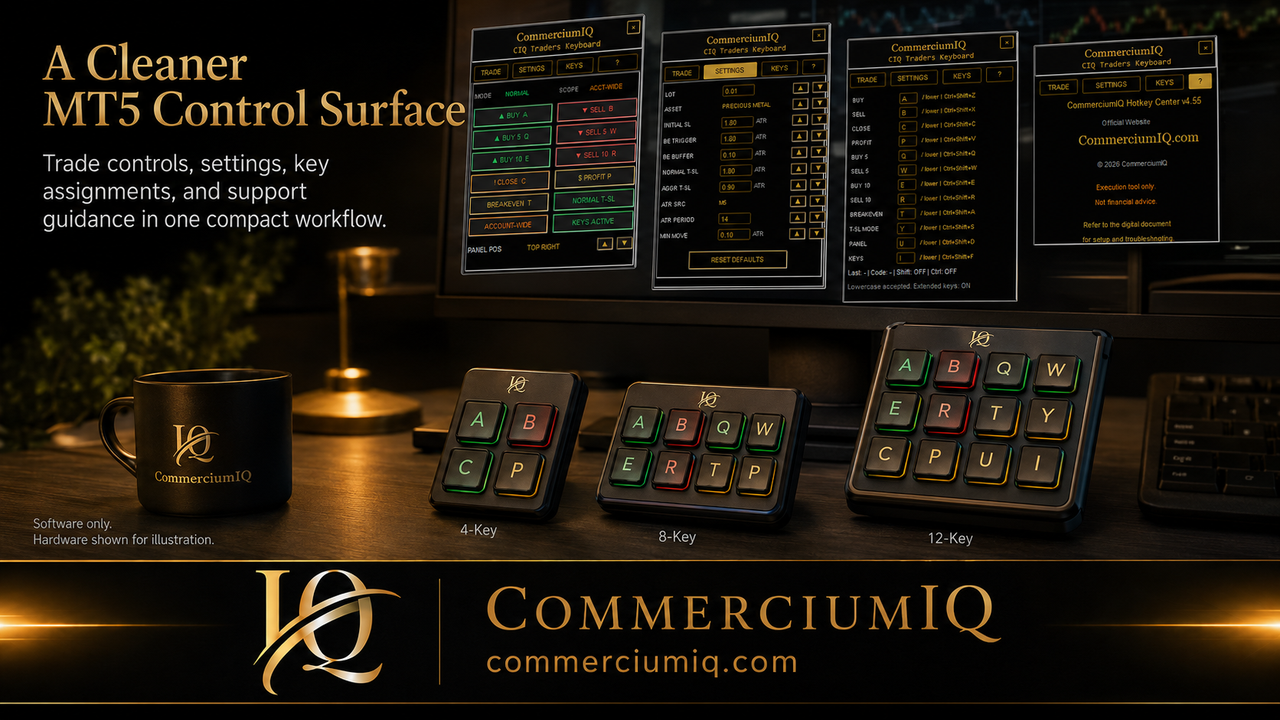
The first check is the included-file description. A software-only product may use hardware-style images to explain a workflow, but that does not automatically mean a keyboard, macro pad, or physical device is included.
A clear product should state whether the buyer receives software access, setup documentation, command guidance, configuration files, or other digital materials. If hardware is not listed, the buyer should assume hardware is not included.
Check two: supported MT5 environment
The buyer should confirm that the tool supports the MT5 desktop environment they actually use. MT5 installations can differ by broker, folder location, account type, and terminal configuration.
Compatibility should be checked before purchase when possible. A tool that fits one setup may not fit another if the user assumes platform details instead of reading the requirements.
Check three: command list clarity
The value of an MT5 trading tool depends on its command list. A product should make it clear whether it supports entries, close actions, protection actions, utility actions, or mapping support.
If a command is not documented, the buyer should not assume it exists. Clear command wording is more useful than broad claims about speed or control.
Check four: command scope
Scope is one of the most important buying checks. A current-symbol action, selected-position action, close-profit action, and account-wide action can all affect MT5 differently.
The buyer should understand whether the tool limits actions to the active chart, a symbol, a position list, or a broader account context. If scope is unclear, support should be asked before purchase.
Check five: setup effort
Some tools are simple, while others require careful installation, terminal permissions, keyboard mapping, device profiles, or product-specific settings. Setup effort is part of the buying decision.
A buyer should be realistic about whether they are willing to follow documentation, test in demo, and maintain their configuration after updates.
Check six: demo-testing expectation
A trustworthy workflow product should encourage demo testing before serious use. Demo testing lets the buyer prove account mode, broker symbol, command scope, and after-state behavior.
A product that invites testing is usually safer than one that implies a shortcut will automatically improve trading outcomes.
Check seven: support boundary
Support should be realistic. A software vendor can usually help with installation, command behavior, documented setup steps, and product files.
Support cannot control broker execution, market movement, device-driver behavior, emotional discipline, or trading decisions. The buyer should know that before expecting the tool to solve every platform issue.
Check eight: refund and license terms
Digital products often have specific refund and license terms. The buyer should read those terms before checkout rather than after the product has been downloaded or accessed.
The buyer should understand whether the license is personal use only, whether redistribution is prohibited, and whether refund eligibility changes after digital delivery.
Check nine: hardware expectations
If a product page shows a keyboard, macro pad, or desk setup, the buyer should separate illustrative workflow imagery from what is actually included.
This is especially important for MT5 command tools, where the software may support keyboard-style workflows without selling a physical keyboard.
Check ten: performance claims
A trading tool should not be purchased because it sounds like it will create better trades. Faster access can reduce repeated clicks, but it cannot pick entries, predict markets, or remove risk.
The stronger buying reason is operational: clearer command access, fewer manual steps, better testing habits, and a workflow that the user can understand.
Where CIQ Traders Keyboard fits
CIQ Traders Keyboard should be evaluated as software-only MT5 hotkey workflow support. Its value is in command organization, setup guidance, and reducing avoidable manual friction.
That distinction keeps the product honest. It helps buyers understand the workflow problem being solved without implying that the software is a signal engine or trading robot.
Final buying rule
The final buying rule is to purchase only when included files, platform fit, command scope, support boundary, refund terms, and demo-testing expectations are clear.
A good MT5 trading tool should reduce operational confusion before and after purchase. It should not create new assumptions that the buyer has to unwind later.
Buyer review drill before checkout
A practical buyer review drill uses one simple question: can the buyer explain exactly what they will receive, where it runs, what it controls, and what it does not control?
If the answer is unclear, the buyer should pause before checkout. The product may still be useful, but the buying decision should not depend on assumptions about hardware, automation, broker behavior, or trading performance.
This review is especially important for MT5 workflow tools because product images, command examples, and hardware-style layouts can be misunderstood if the included files are not read carefully.
Questions to ask support before purchase
A buyer can ask support direct questions before purchase: does this work with MT5 desktop, is hardware included, what commands are supported, how is command scope handled, and what should be tested in demo first?
The best support questions are specific. They mention the operating system, MT5 terminal, broker symbol style, intended input device, and the workflow the buyer wants to improve.
Specific questions create useful answers. Vague questions often lead to vague expectations.
A careful buyer profile
The best buyer for an MT5 workflow tool is not someone looking for a guaranteed trading result. The best buyer is someone who already understands that manual decisions, risk control, broker execution, and platform verification remain their responsibility.
That buyer values clearer command access, written setup guidance, repeatable testing, and a software workflow that can reduce operational friction.
This buyer profile clarifies who the product is for and excludes expectations that it will replace a trading plan.
Final buyer verification step
Before checkout, the buyer should be able to describe the product in one plain sentence: this is software workflow support for MT5, it does not include hardware unless stated, and it does not replace the trader's decision-making.
That one-sentence test exposes most weak assumptions. If the buyer cannot explain what the product includes, which platform it supports, and what remains outside the product boundary, the buying decision should pause until those points are clear.
For CIQ Traders Keyboard, the clean buying reason is operational workflow clarity: command access, setup guidance, and demo-tested MT5 behavior.
Post-purchase readiness check
A careful buyer should also know what happens after purchase. The next steps should be installation, reading the setup guide, confirming the MT5 environment, testing one command at a time in demo, and recording any unexpected platform message.
This post-purchase view matters because a good purchase is not finished at checkout. The tool only becomes useful when the buyer installs it carefully and proves the workflow before relying on it.