
Key point
A software-only trading tool provides software, workflow controls, documentation, and supported setup guidance. It does not include a physical keyboard, macro pad, Stream Deck device, broker service, strategy, signal service, or guaranteed trading result unless a product page explicitly says otherwise.
This boundary should be stated clearly because trading product searches often mix software, hardware, scripts, panels, and automation into one vague category.
What software-only means
Software-only means the buyer is purchasing a digital tool rather than a shipped physical device. In the MT5 workflow context, that can include a command panel, keyboard mapping, shortcut support, setup documentation, and product updates.
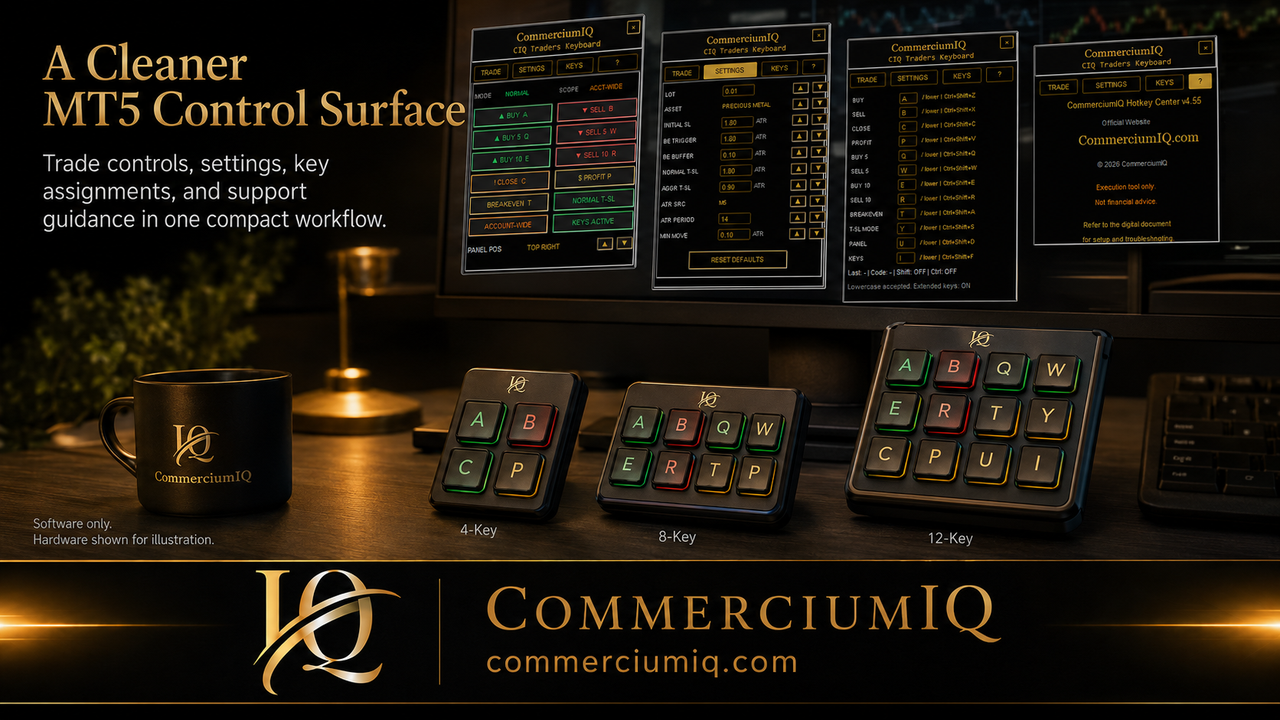
The product may show example hardware or workflow diagrams, but those examples should be understood as illustrations.
The buyer remains responsible for any third-party keyboard, macro pad, computer, broker platform, and MT5 environment.
What it does not mean
Software-only does not mean automatic trading, broker execution quality, live-account readiness, or financial advice. It does not mean the product chooses trades or improves market analysis.
It also does not mean every third-party device is supported just because the device can send keyboard input.
Evaluate the software feature separately from the buyer's broader trading setup.
Why the distinction matters for MT5
MT5 workflows often depend on platform focus, account mode, broker symbol naming, permissions, chart context, and open position state. A software tool can help organize manual commands, but it still operates inside the user's environment.
If the user has the wrong terminal open or uses a broker symbol with a suffix they did not test, the workflow can become confusing.
This is why compatibility pages and demo-testing content are not optional extras.
Hardware examples are not product inclusions
A page may show a macro pad, clean desk setup, keyboard illustration, or command-center image to explain a possible workflow. Those visuals should never imply hardware is included unless the purchase page says so directly.
For CIQ Traders Keyboard, the safer wording is software-only MT5 workflow support, with hardware shown as optional input inspiration.
This keeps expectations accurate and reduces avoidable refund or support confusion.
Manual workflow support is not strategy automation
A software-only command center can make manual actions easier to reach. It should not be described as a strategy engine, signal generator, market predictor, or automated profit system.
The trader still chooses whether to enter, exit, protect, close, or avoid a trade.
The product's value is operational clarity, not a promise that trading decisions will become profitable.
Compatibility needs a real checklist
A software-only product should explain the supported operating system, MT5 desktop requirement, platform version assumptions, input methods, and any limitations. A buyer should know whether the product is intended for Windows desktop MT5 before purchase.
Compatibility language should also make clear that web terminals, mobile apps, or unsupported platforms may not behave the same way.
This protects both the buyer and the support process.
Support boundaries should be visible
Support should cover the software product, setup guidance, and documented workflows. It should not silently absorb every problem caused by a third-party device, operating system customization, broker outage, platform permission issue, or unsupported MT5 environment.
That does not mean the product cannot provide helpful guidance. It means the boundary should be clear before purchase.
Clear boundaries make support more professional and reduce misunderstandings.
Software-only can still use physical inputs
A software-only tool may still support keyboard shortcuts or external input devices if those devices send supported key commands. The important point is that the hardware is user-supplied and separately configured.
The user should test the software command first, then test the physical device mapping second.
A physical key that triggers the wrong command is a mapping issue even if the software itself is working.
Why demo testing remains required
Software-only does not remove the need for demo testing. The user should verify account mode, exact broker symbol, command scope, lot size, position state, and MT5 permissions before using any command seriously.
A clean installation is not the same as a proven workflow.
A tested workflow produces evidence: expected result, actual result, and a note about the setup used.
How this helps buyers compare products
When comparing MT5 tools, buyers should ask what is actually included, what environment is supported, what commands are provided, what hardware is excluded, what support covers, and whether the product encourages demo testing.
A product with clear boundaries may look less flashy than one with vague claims, but it is easier to evaluate and safer to support.
That clarity helps buyers evaluate the product without hype.
Final software-only rule
A software-only trading tool should make the manual workflow clearer without pretending to be hardware, automation, advice, or a broker service.
The user should understand what is included, what is excluded, how commands are tested, and what setup responsibility remains with them.
That is the cleanest way to sell an MT5 workflow tool without creating unrealistic expectations.
How to read product screenshots
Product screenshots should be read as workflow examples unless the page clearly states that hardware is included. A screenshot may show a clean command surface, a macro pad idea, or a simulated setup, but the purchase boundary is defined by the product description and checkout page.
This matters for trust. If a software product uses hardware-style visuals, the copy around the image should make the software-only boundary visible.
A buyer should always check the included files, license terms, compatibility page, and support notes before assuming what comes with access.
Why software-only wording helps buyers and support
The phrase software-only is useful because it answers a real buyer question before it becomes a support problem. Many visitors search for trading keyboards, macro pads, hotkey tools, MT5 panels, and execution shortcuts without knowing which category they actually need.
A clear software-only explanation helps visitors understand the offer and compare the product honestly.
It also protects the brand from overpromising by keeping hardware, broker services, financial advice, signals, and automation outside the product promise.
Final buyer check
Before buying any software-only MT5 workflow tool, the user should confirm the supported platform, the included digital files, the command list, the refund terms, the support path, and the demo-testing expectation.
If those pieces are clear, the buyer can evaluate the tool on workflow fit instead of assumptions.
If those pieces are unclear, the safer decision is to pause and ask support before purchase.
One final inclusion check
The simplest final check is to ask what the buyer receives after purchase. If the answer is software access, setup instructions, mapping guidance, and support documentation, the product should be understood as software-only. If hardware, broker services, signals, or automation are not listed on the checkout page, they should not be assumed.