
Key point
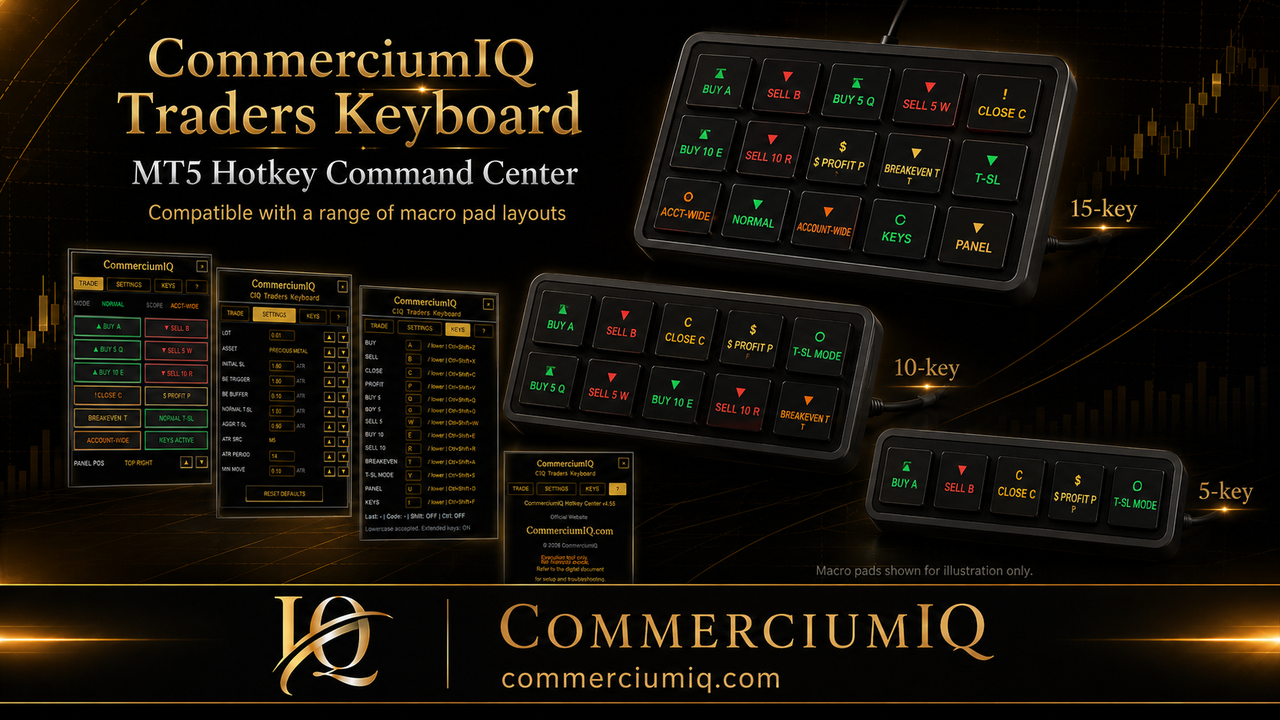
A four-key, eight-key, or twelve-key macro pad can all support an MT5 workflow, but the safest choice depends on how many commands the trader can clearly explain and test.
The layout should grow from the trading routine. It should not start from the number of empty keys available on a device.
Why key count matters
Key count changes how much the trader can place directly on the pad. A smaller pad limits options and reduces clutter. A larger pad gives more room but also creates more chances to press the wrong command.
For MT5 trade management, the important question is not whether a device has enough keys. The important question is whether the trader can separate entry, protection, close scope, and utility functions without confusion.
A layout that requires too much memory is not safer. The trader should know what each key does, what account or symbol context matters, and what result should appear in the platform history.
Four-key macro pads
A four-key macro pad is best for a narrow routine. It can hold a panel toggle, mapping screen, breakeven command, and one clearly scoped close command. It can also hold buy, sell, breakeven, and close current symbol, but that setup requires careful demo testing.
The strength of a four-key layout is restraint. There are fewer choices and fewer labels. The weakness is that it may not support enough actions without layers, modifiers, or hidden meanings.
Four keys can be a good starting point for a beginner or for a trader who wants only the most common management actions within reach.
Eight-key macro pads
An eight-key macro pad often gives the best balance. It can separate entry controls from protection controls and still leave room for utility functions like panel toggle or mapping.
One possible structure is two entry keys, two protection keys, two close-scope keys, and two utility keys. The exact commands should reflect the trader's tested workflow, not a generic template.
Eight keys also give enough physical space to keep dangerous commands away from ordinary controls. That spacing can matter during fast sessions.
Twelve-key macro pads
A twelve-key macro pad is better suited to experienced workflows. It can include multiple entry sizes, trade-management commands, close-scope commands, mode changes, and utility keys.
The risk is overconfidence. A trader may add more commands because the keys are available, not because the routine needs them. More buttons can make the layout look complete while making real use less reliable.
A twelve-key layout should be introduced only after the trader has a written map and a demo record showing what each command does.
How to choose between them
Choose four keys when the goal is to learn the workflow and test a small number of actions. Choose eight keys when the trader needs a balanced manual command center. Choose twelve keys when the trader has a proven routine and needs more direct access without layers.
The choice should also reflect the trader's environment. A laptop user, desktop user, scalper, and swing trader may all prefer different layouts because their repeated actions are different.
The best layout is the one that reduces mistakes for that trader, not the one that looks most advanced.
Avoid hidden layers at the start
Some macro pads support layers, profiles, or modifier keys. These can be useful later, but they can also create confusion if the trader forgets which layer is active.
For MT5 trade management, hidden state is risky. If a key can do one thing on one layer and another thing on another layer, the trader needs a clear way to confirm the active layer before pressing.
A beginner layout should avoid hidden behavior until the basic command map is reliable.
Match the pad size to the user's hand and desk
The best key count is also physical. Some traders have limited desk space, use a laptop, or keep the macro pad beside a mouse. Others want a larger pad that can sit at an angle beside the keyboard.
A layout that is hard to reach can create mistakes even if the labels are excellent. The hand should naturally land in the same position each time.
This is another reason to test the setup outside live trading. Comfort, reach, and accidental contact are part of the workflow.
Think about future product expansion
A four-key setup may be enough for a simple MT5 routine, while a larger setup may be useful for future platform products or additional trade-management features. The site should explain the concepts without promising that every future tool will use the same map.
For the current product, keep the public message focused on MT5 Desktop/Windows manual workflow support. Future TradingView, cTrader, or other platform products should not be implied in the current sales promise until they exist.
A layout can expand after the current workflow has been tested.
Use a size progression instead of a permanent choice
A trader does not need to choose one macro pad size forever. A four-key layout can be a training step, an eight-key layout can become the main routine, and a twelve-key layout can be reserved for a mature workflow.
This progression is safer than jumping directly into the largest layout. Each added key should have a reason, a label, and a demo-tested result.
If the added key does not improve the routine, it should not stay on the active layout just because space exists.
Test the chosen size in demo
After selecting a size, test the pad in a demo account with the exact command map. Test one position, multiple positions, the wrong symbol scenario, and repeated key presses after a delay.
The result should match the label every time. If the trader cannot predict the result, the problem is not the hardware size. The problem is the workflow design.
Only after the size, labels, and command scope are proven should the trader consider using the layout in a more serious environment.
When to change sizes
A trader should change sizes only when the workflow proves the need. If a four-key pad causes too many layered shortcuts, move up to eight keys. If an eight-key pad forces important controls too close together, consider a larger layout.
If a twelve-key pad creates confusion, move down rather than adding more labels. The right size is the one that makes the safe action obvious.
The layout decision should be reviewed after several demo sessions, not after one setup session.
A practical recommendation
For most manual MT5 users, an eight-key layout is the most practical first serious layout because it provides enough room for separation without encouraging a large command wall.
A four-key layout is useful for learning or very narrow management routines. A twelve-key layout can be useful later, but it should be earned by a documented workflow rather than chosen for appearance.
The safest answer is not one device size. The safest answer is the smallest layout that supports the trader's tested routine without hiding risk.