
Key point
A physical trading keyboard, Stream Deck-style device, and macro pad can all support MT5 workflow access, but none of them replace platform understanding, command scope, or demo testing.
The safest setup is the one the trader can label clearly, test repeatedly, and explain before pressing any command.
What a physical trading keyboard means
A physical trading keyboard usually means a dedicated device or key layout that makes trading commands easier to reach. It may look more professional, but the hardware itself does not make the workflow safer.
The value depends on what each key sends, how the key is labeled, and whether the trader understands the command's scope.
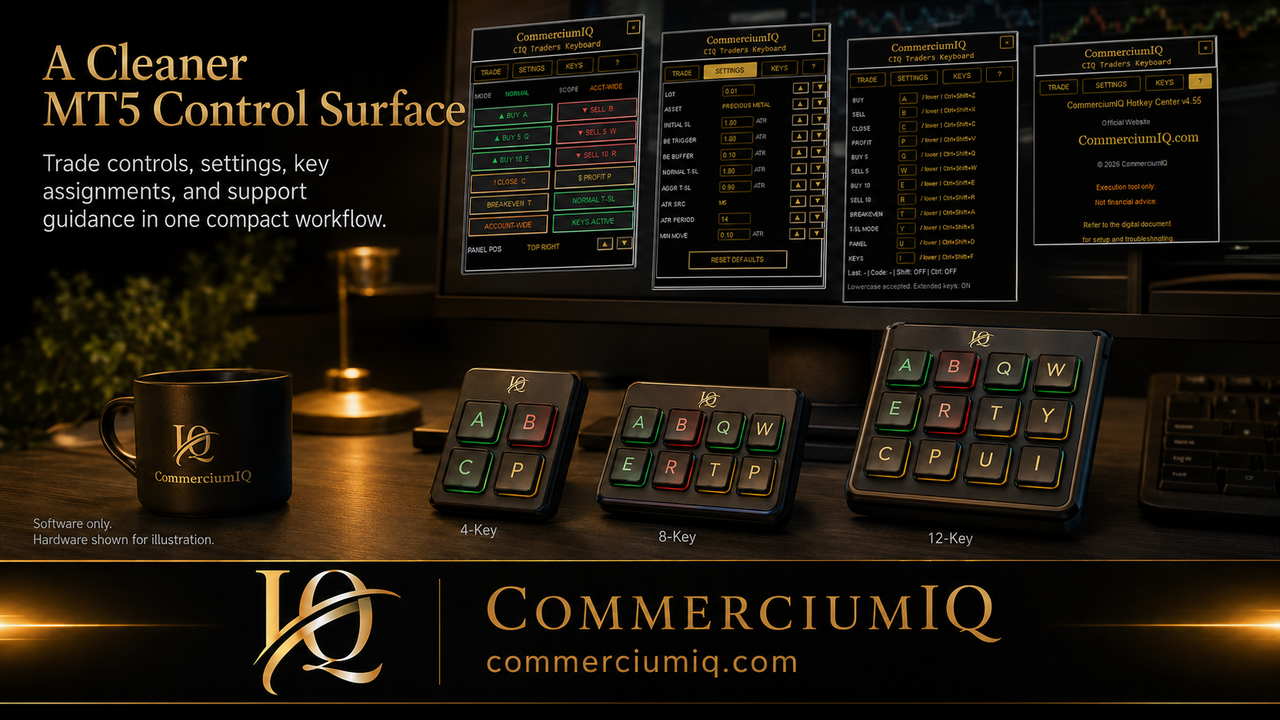
For CIQ Traders Keyboard, hardware examples should be treated as setup illustrations unless a product page explicitly says hardware is included.
What a Stream Deck-style setup adds
A Stream Deck-style device can show visual labels, icons, pages, and profiles. That can be useful because the command name is visible rather than hidden behind a plain key.
The risk is complexity. Too many pages, icons, and modes can make the trader search during pressure instead of following a simple routine.
A visual device works best when the command set is small, grouped, and tested in demo.
What a macro pad adds
A macro pad provides physical keys that can be mapped to a smaller set of actions. It can be useful for traders who want tactile control without a large device.
The strongest macro pad layouts usually separate entry, protection, close, and utility commands. High-impact commands should not sit where they can be pressed accidentally.
A macro pad is not automatically safer than keyboard shortcuts. It becomes safer only when the layout, labels, and test routine are clear.
Why software mapping still matters
All three options depend on software behavior somewhere in the chain. A key, button, or pad must send a command that the MT5 workflow layer understands.
That means the user must confirm the exact mapping. If the device profile changes, the product is updated, or Windows changes input behavior, the setup should be retested.
The physical device is only the visible layer. The workflow result still happens through software.
Compare by clarity, not by appearance
The best-looking setup is not always the safest setup. A clean device with too many unlabeled or poorly understood commands can create avoidable mistakes.
A simpler layout with fewer actions may be better for a manual MT5 trader who wants repeatable execution support.
The comparison should focus on clarity, supportability, and demo-test evidence rather than the most impressive desk photo.
Close commands need extra care
Any device that can close positions, close profitable positions, move stops, or affect current-symbol scope needs a stronger confirmation habit.
A close command can feel protective, but it can still affect the wrong exposure if the trader has not checked account, symbol, and command scope.
This is why close commands should be labeled, separated, and tested more carefully than harmless utility commands.
Best fit for different users
A physical trading keyboard may fit users who want a dedicated workstation feel. A Stream Deck-style device may fit users who want visible labels and profiles. A macro pad may fit users who want a compact group of high-use commands.
A beginner may be better served by ordinary MT5 controls first, then a small macro layout after they understand the platform.
The right choice is the one that matches the user's current workflow maturity.
Demo testing checklist
Before serious use, test every mapped command in demo. Confirm the account, symbol, volume, command scope, expected result, and actual MT5 result.
The user should also test what happens after switching charts, changing symbols, and opening more than one position.
If a command creates surprise, remove it from the fast-access device until the behavior is understood.
Software-only product boundary
CIQ Traders Keyboard is software-only MT5 workflow support. Hardware photos, macro pad ideas, and keyboard-layout examples are educational visuals; physical hardware is not included.
This boundary protects buyer expectations. Users should know whether they are buying software, hardware, or both before checkout.
Clear boundaries also reduce support confusion after purchase.
Final comparison summary
A physical trading keyboard, Stream Deck, or macro pad can support a more visible MT5 workflow, but the real safety comes from command design and user discipline.
The best setup is not the one with the most keys. It is the setup that makes the intended action obvious and the dangerous action harder to trigger by mistake.
The safest rule is simple: choose the input device only after the workflow is clear.
Compare the device by how mistakes happen
The useful comparison is not only price, desk appearance, or the number of buttons. The useful comparison is how easily the user can press the wrong command when the chart is moving.
A Stream Deck-style device can show labels, but profiles can change the meaning of a button. A macro pad can feel simple, but a poor label can still create confusion. A larger trading keyboard can separate commands, but it can also encourage too many controls.
For MT5, the best device is the one that makes the expected result easiest to confirm before the command is sent.
Plan the layout before buying hardware
A trader should sketch the command layout before purchasing hardware. The sketch should show entry commands, protection commands, close commands, utility commands, and any commands that should be kept away from accidental presses.
This planning step prevents the buyer from choosing a device first and then forcing a workflow into the available buttons. The workflow should drive the device choice, not the other way around.
If the planned command set fits on paper and stays readable, it has a better chance of working on a physical device.
Keep device profiles simple at first
Profile switching can be useful, but it should be avoided in the first version of a serious MT5 workflow unless the user has a clear reason for it. A single visible profile is easier to explain and easier to test.
When one button can mean different things in different modes, the user must verify the active mode before using the device. That extra mental load can be dangerous during fast market conditions.
Start with a simple setup, then add more complex profiles only after the basic setup is reliable.
Use the same safety wording across pages
The website should repeat the software-only boundary consistently. A physical device may be shown as a possible input example, but the public product should not imply that hardware is included unless that is truly part of the offer.
This matters because visitors can land on any article from search. Someone who starts on a hardware comparison page should receive the same expectation-setting as someone who starts on the pricing or support page.
Consistent wording reduces support issues and keeps expectations aligned with the product's actual scope.
Review the setup after real use
Even after demo testing, the trader should review the device after several practice sessions. The review should ask which keys were used, which keys caused hesitation, and which labels were unclear.
If a key is rarely used or creates confusion, it should be removed from fast access. A clean device should evolve from observed use, not from the desire to fill every available button.
This review habit helps turn a hardware idea into a controlled MT5 workflow.